
For the complete BrainAPI documentation index, see llms.txt. A markdown version of any docs page is available by appending .md to its URL. Docs MCP: /docs/mcp.
Extracting Entities
Extracting entities with information from memory
One of the biggest advantages of Lumen Brain is the ability to retrieve information and relationships between entities in a blink of an eye. Modern LLMs are great at reasoning but they need time to generate tokens even for reasoning, this makes them slow to answer questions that require reasoning.
Entity Extraction API is designed to be used alongside LLMs. While LLMs excel at generating text, this API enables lightning-fast information extraction. This is especially useful when you want your LLM to answer reasoning-based questions without relying on naive RAG approaches or raw, lengthy text chunks. By providing concise, relevant context immediately—without waiting for the LLM to use external tools that could further slow down the response—you can achieve much faster answering times.
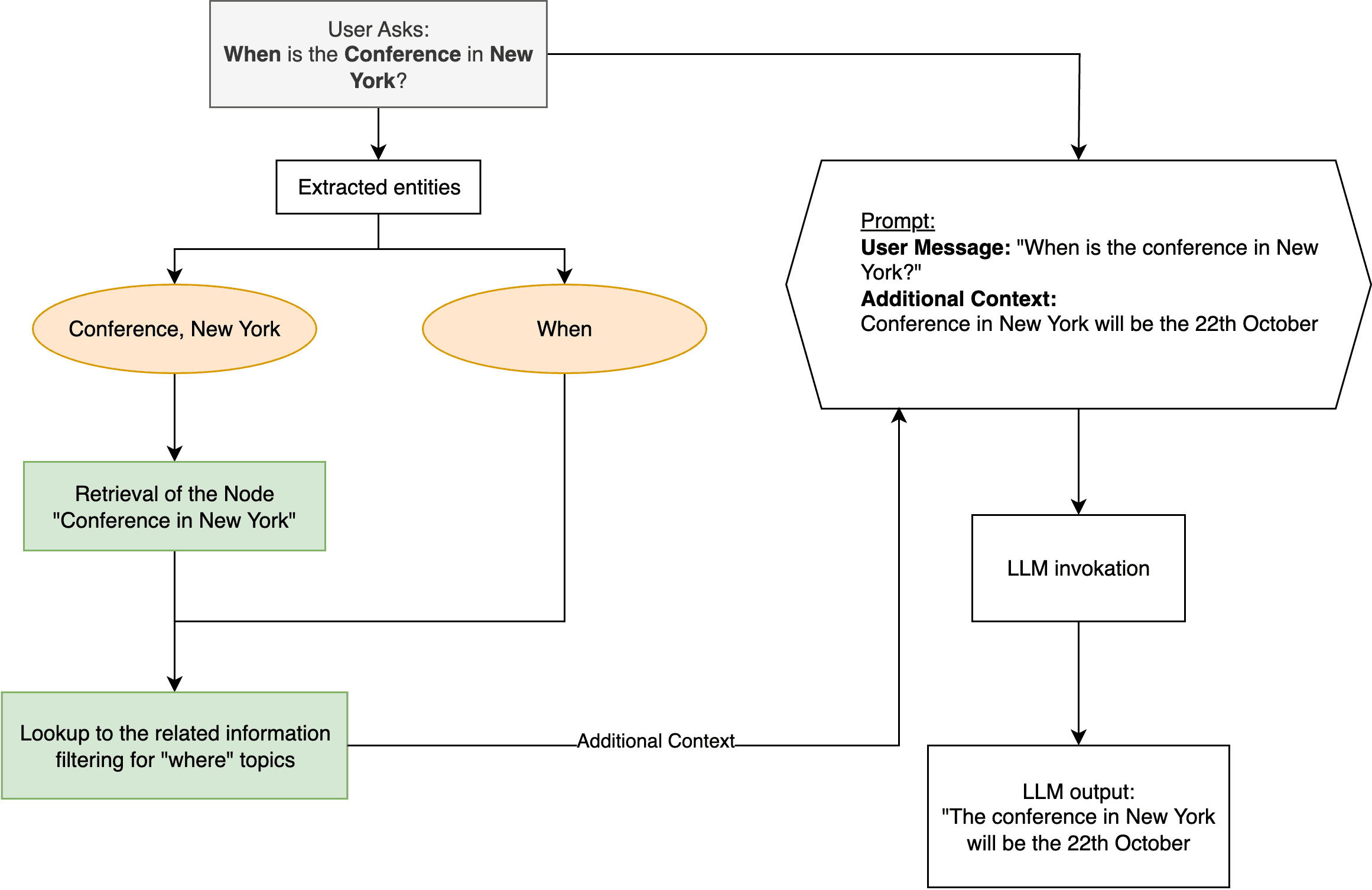
Example
import { LumenBrainDriver } from "lumen-brain";// Initialize the driver with your API keyconst brain = new LumenBrainDriver("your-api-key");// Few previously saved messagesawait brain.saveMessage("mem-uuid", "Mary's husband is John", "user", "conv-123");await brain.saveMessage("mem-uuid", "John's wedding will be the 22th of October", "user", "conv-123");await brain.saveMessage("mem-uuid", "Mary's wedding will occur during the conference in New York", "user", "conv-123");/*** Note that we never said when the conference in New York will occur.*/// User asks a questionconst userMessage = "When is the Conference in New York?";// Retrieve the entitiesconst result = await brain.fetchInfo( "mem-uuid", ["Conference", "New York"], // Subject entities "When", // What we are looking for);console.log(result.most_relevant_relation.related_node.name);// Result will be "22th of October"Confidence Score
You can access the confidence score that can tell you how likely the most relevant relation is to be true by using the <result>.most_relevant_confidence property.
Importing
Start by importing the Driver class.
import { LumenBrainDriver } from "lumen-brain";// Initialize the driver with your API keyconst brain = new LumenBrainDriver("your-api-key");Retrieving additional context
You can retrieve information about entities from few hundred millisecond to few seconds in some edge cases, depending on your location, internet connection and the number of entities and relations you have in your memory. Generally speaking the retrieval is fast and easy to use out of the box.
const result = await brain.fetchInfo( "mem-uuid", ["Conference", "New York"], // Subject entities "When", // What we are looking for);Prop
Type
Result
The result will be an object where you can access the relevent nodes and relationships, the most relevant relation and the confidence score for the most relevant relation.
export interface Node { natural_lang: string; // A natural language representation of the node id: string; // The unique identifier of the node parent_id: string | null; // The parent node id name: string; // The name of the node (Entity, e.g. "John", "New York", "Conference") relationships: Relationship[]; // The relationships of the node source_id: string; // The source id of the node, it could be the message id, the file id, the email id, the webpage id, etc. phrase: string; // The phrase containing or describing the node (e.g. "Mary's husband is John")}export interface Relationship { name: string; // The name of the relationship (e.g. "IS_HUSBAND_OF", "IS_WIFE_OF", "OCCURS_DURING", "IS_LOCATED_IN") phrase: string; // The phrase describing the relationship (e.g. "Mary's husband is John") direction: string; // The direction of the relationship (e.g. "inbound", "outbound") natural_lang: string; // A natural language representation of the relationship related_node: Node; // The related node similarity: number; // The relevance of the relationship with the searched information (0-1) source_id: string; // The source id of the relationship, it could be the message id, the file id, the email id, the webpage id, etc.}export interface QueryEntitiesResponse { nodes: Node[]; most_relevant_relation: Relationship | null; // The most relevant relation most_relevant_confidence: number | null; // The confidence score of the most relevant relation (0-1)}